Personal software is built around the needs of one person or a small group. A real routine sets its scope: organizing a browser window, finding a saved reference, comparing outfits, or keeping meeting notes in files you own.
It can be a script, an extension, a spreadsheet, or an app. It does not need AI or a business model. What matters is whether it fits the person using it.
This use of the term is separate from the Personal Software Process methodology. Here, personal describes who the tool is made for.
That focus is what connects my personal software projects. They look different because each solves a different problem in my routine.
Why people are talking about personal software now
On October 11, 2026, Pieter Levels wrote:
It’s now the era of personal software and everyone just builds what they need whenever they need it I think
— Pieter Levels, on X, also archived on his site.
What makes that prediction interesting is the shift in who decides what gets built. Until recently, fixing a recurring annoyance required either enough commercial demand to get onto someone else’s product roadmap, or enough spare time to justify writing the code yourself. AI-assisted development lowers that threshold, making far more of these small projects worth attempting.
That does not drop the cost of software to zero. You still have to decide what the tool should do, verify its output, and keep it running when things break. Reaching a first working version is getting much easier, though, and that changes which ideas get a chance to exist.
Lee Robinson grounded this shift in a concrete example in his January 2025 essay:
Software can now adapt to you, not the other way around.
— Lee Robinson, “Personal Software”.
His example is a tool for tracking his baby’s sleeping and eating. The routines of two parents define the product, so it does not need every feature a commercial parenting app might offer.
This idea is older than AI coding
People were building small, single-household tools long before language models started writing code. In February 2020, Robin Sloan described a messaging app he made just for his family:
I am the programming equivalent of a home cook.
— Robin Sloan, “An app can be a home-cooked meal”.
Cooking dinner at home is worthwhile on its own; you do not have to open a restaurant to justify it. Software can have the same relationship to a household, a hobby, or one person’s daily work.
In March 2023, Geoffrey Litt looked at how language models could bring this kind of toolmaking to more people. Beyond building standalone apps from scratch, he talked about modifying existing software and spinning up temporary interfaces on the fly. He summed up the shift as:
changing when software gets created, by whom, for what purpose.
— Geoffrey Litt, “Malleable software in the age of LLMs”.
Personal software describes who a tool serves; malleable software describes how easily you can reshape it. A personal tool should leave room for its owner’s habits to change.
Five personal software examples from my own projects
Tabbit: organize the browser I already use
Tabbit organizes open tabs using Chrome’s native tab groups. The underlying problem was minor: Chrome already had the grouping feature I wanted, but maintaining those groups manually was a chore.
It keeps Chrome’s existing interface. Local development tabs get their own group, and grouping has a fallback when a model call fails. Those choices come from the browser windows I use.
Birdbrain: find something I saved months ago
Birdbrain pulls my X bookmarks into a local archive and adds topic labels and summaries. I built it so I could dig up a useful link months later without having to remember the author’s handle or the exact phrasing of the post.
It works with the habit I already have: bookmarking on X. I wrote a separate case study of the archive, search, and privacy tradeoffs if you want the architectural details.
Fitroom: compare outfits for two particular people
Fitroom renders two people side by side in selected outfits. The constraints that make it useful are narrow and specific: reuse the reference photos, preserve the two people’s relative heights, and compare combinations in a single image.
It is a visual decision aid, with limits even for that narrow job. A generated image cannot prove that a garment will fit or that the fabric details are accurate.
Turntable: make images for the things I build
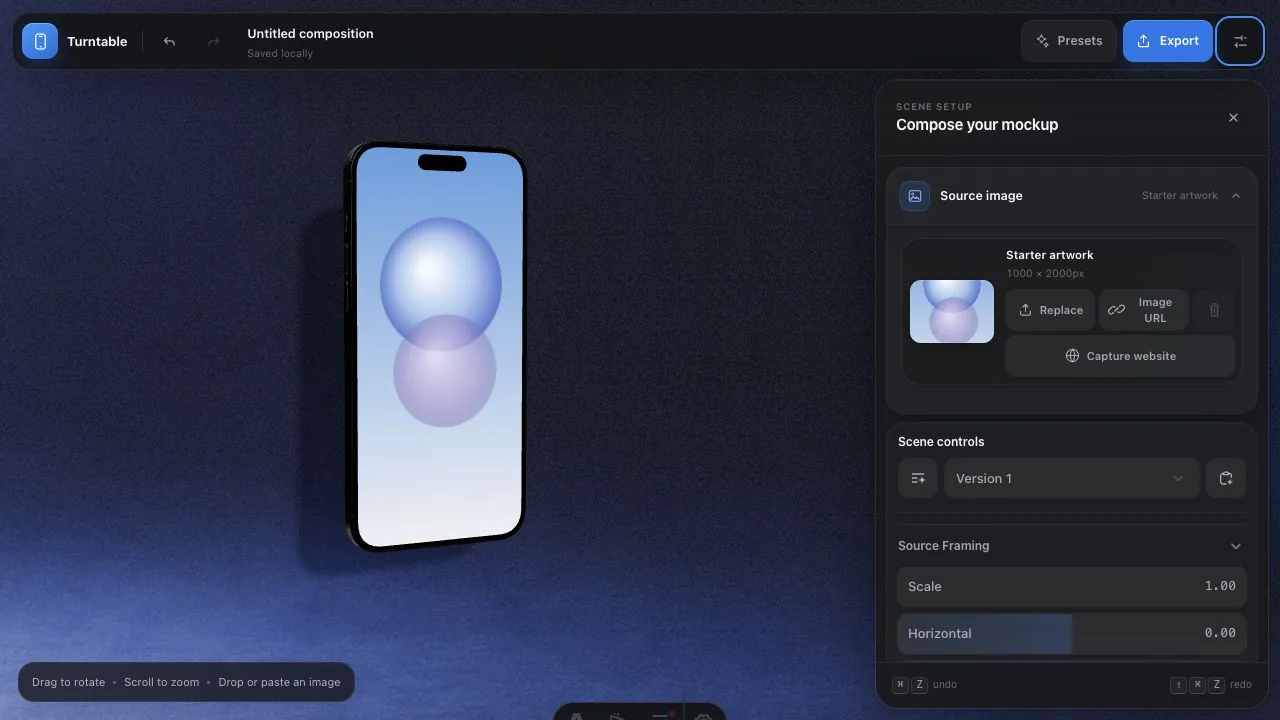
Turntable turns UI screenshots into 3D device mockups right in the browser. I built it because putting together launch images for projects is something I end up doing over and over. For that job, having predictable export dimensions and a scene state that survives a page refresh matters much more than having a sprawling design suite.
Stone: keep working context in files I own
Stone brings my notes, journals, tasks, and meeting records together around plain Markdown files. My main requirement was longevity: those records need to stay readable and useful even if I switch editors down the road.
Because of that, the storage format matters far more than any AI capability. Local search and transcription run directly on my machine, while cloud text generation is kept separate and optional. My Stone introduction walks through how I drew that boundary.
Personal software and vibe coding are different ideas
Personal software and vibe coding often come up together, but they describe different things. Personal software is about purpose and audience. Vibe coding is an approach to generating code with AI. A hand-written shell script can be personal software, while an AI-generated commercial app can serve thousands of customers.
Keeping those two ideas separate helps you set the right engineering bar. Having an audience of one justifies skipping features you will never use, but it does not justify silently corrupting the only copy of your notes.
The consequences of a bug should dictate how much engineering rigor you apply. If I am writing a one-off text formatter, eyeballing the output is usually enough verification. If I am building a tool that mutates local files or maintains a long-term archive, I want visible error states, recovery paths, and an easy way to inspect the raw data on disk.
When should you build instead of buy?
Building your own tool makes the most sense when the job is narrow, off-the-shelf software forces you into an awkward workflow, and you can easily tell whether the output is right. It is an especially good fit when the missing capability belongs right inside a tool or file format you already use every day.
Buying is usually the better call when an existing product already fits your workflow, when you need reliable multi-user collaboration, or when you simply do not want another thing to maintain. Ongoing support, OS updates, cross-device sync, and data recovery are real work, and that is part of what a subscription pays for.
If you are weighing the two, count the full cost of ownership: initial build time, API and model usage, hosting, inevitable repairs, and your own ongoing attention. A quick first version does not establish that building was cheaper.
Start with one recurring annoyance
If you want to try building something for yourself, pick a small task you did manually at least twice this week. Write down what goes in, what should come out, and the specific kind of mistake that would make you stop trusting the tool. Then build the smallest version that actually handles that situation.
These small tools matter when they earn a place in your daily routine. My next post walks through how to build a first personal tool, complete with a concrete brief and the checks worth running before you rely on it.