Personal project
Tabbit
github.com →Overview
Chrome already has a good answer to tab chaos — native tab groups — but nobody has the patience to maintain them by hand. Tabbit’s entire thesis is that the feature just needs a librarian. It is deliberately not another tab manager: no new UI to live in, no sidebar workspace, no account. One click, and your window snaps into labeled, colored, native groups.
How the idea started. My browser regularly becomes a map of the work in progress: localhost servers, GitHub, infrastructure dashboards, documentation, internal tools, and AI assistants all mixed into one strip. Chrome’s native groups are useful, but manually creating and maintaining them is exactly the kind of small chore that disappears until the window is unmanageable. Tabbit came from wanting the groups without the housekeeping.
Why it is personal software. I use Tabbit on the browser state I already have instead of moving that state into somebody else’s tab-management system. It knows that local development deserves its own group, accepts a one-line description of the way I work, and uses my own API key. There is no account, sync service, or new workspace to maintain—the extension does one recurring job for me and then gets out of the way.
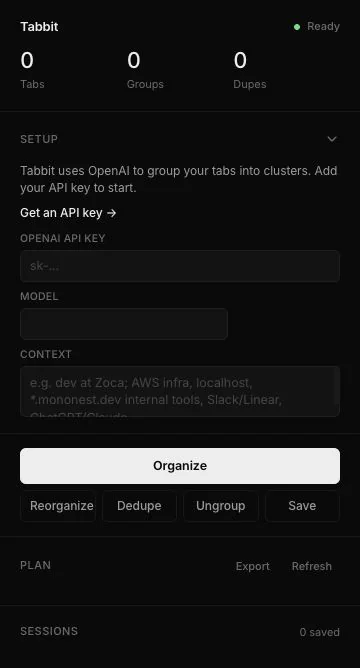
Organize is one honest action. The popup reads the current window’s tab titles and URLs, sends them to an OpenAI model with a strict JSON contract, and applies the returned plan through Chrome’s own tabGroups API. Because the output is native groups, everything stays reversible and familiar — collapse them, rename them, or hit Ungroup and be back where you started.
It respects how developers actually browse. Any localhost, 127.0.0.1, or 0.0.0.0 tab is peeled off into a guaranteed Local group before the AI ever sees the list — your dev servers never end up filed under “Miscellaneous.” If the model call fails or returns bad JSON, a built-in heuristic groups by domain instead, so the button always works.
The small features are held to the same standard. Dedupe normalizes URLs — stripping tracking parameters and fragments — before closing exact duplicates, and never touches active or pinned tabs. Sessions snapshot a window to local storage and restore it later. A one-line context field (“dev at Acme: AWS infra, Linear, ChatGPT”) steers the AI’s group names toward your actual life.
And it stays honest about privacy and weight. Only titles and trimmed URLs are sent, exclusively to OpenAI with your own key, which never leaves chrome.storage.local. The whole extension is plain Manifest V3 JavaScript — no framework, no bundler, no dependencies — with the grouping logic factored into pure functions that run under Node for tests.
Key Achievements
- One-click organization — Reads tab titles and URLs, asks a model to cluster them by theme, and applies the plan as native Chrome tab groups
- Developer-aware grouping — localhost, 127.0.0.1, and 0.0.0.0 tabs always land in a guaranteed Local group, even if the AI call fails
- Safe deduplication — Strips tracking parameters before comparing, closes exact duplicates, and always protects active and pinned tabs
- Zero-dependency footprint — Plain Manifest V3 with no framework, no bundler, and no build step; the grouping logic is pure, unit-tested functions
Technologies
Outcome
Tabbit turns tab cleanup from a recurring chore into a single, reversible action that works with Chrome rather than replacing it.